Affiliate program for Shorts creators
Get paid for your Dota 2 clips
Add the NeznakovBoost banner to your Shorts, Reels, TikTok or VK Clips — we pay for the views of every video that carries it. Once a month, to a card, via SBP or in USDT.
- YouTube Shorts
- Instagram Reels*
- TikTok
- VK Clips


What to make
Dota 2 only — in any format
Videos where Dota 2 is the main topic. Other games and general content are not part of the program.
-
Highlights and rampages
The best moments of matches: rampages, comebacks, saves on the last HP.


-
Memes and fails
Silly deaths, bugs and failed buybacks — the stuff people send to friends.


-
Stream clips
Big moments from Dota 2 streams: reactions, emotions, best games.

-
One-minute guides
Quick tips: builds, timings, hero tricks, how to climb MMR.

-
Pro scene and patches
Tournaments and players of The International and the Majors, breakdowns of updates and the meta.


Examples
What videos with the banner look like
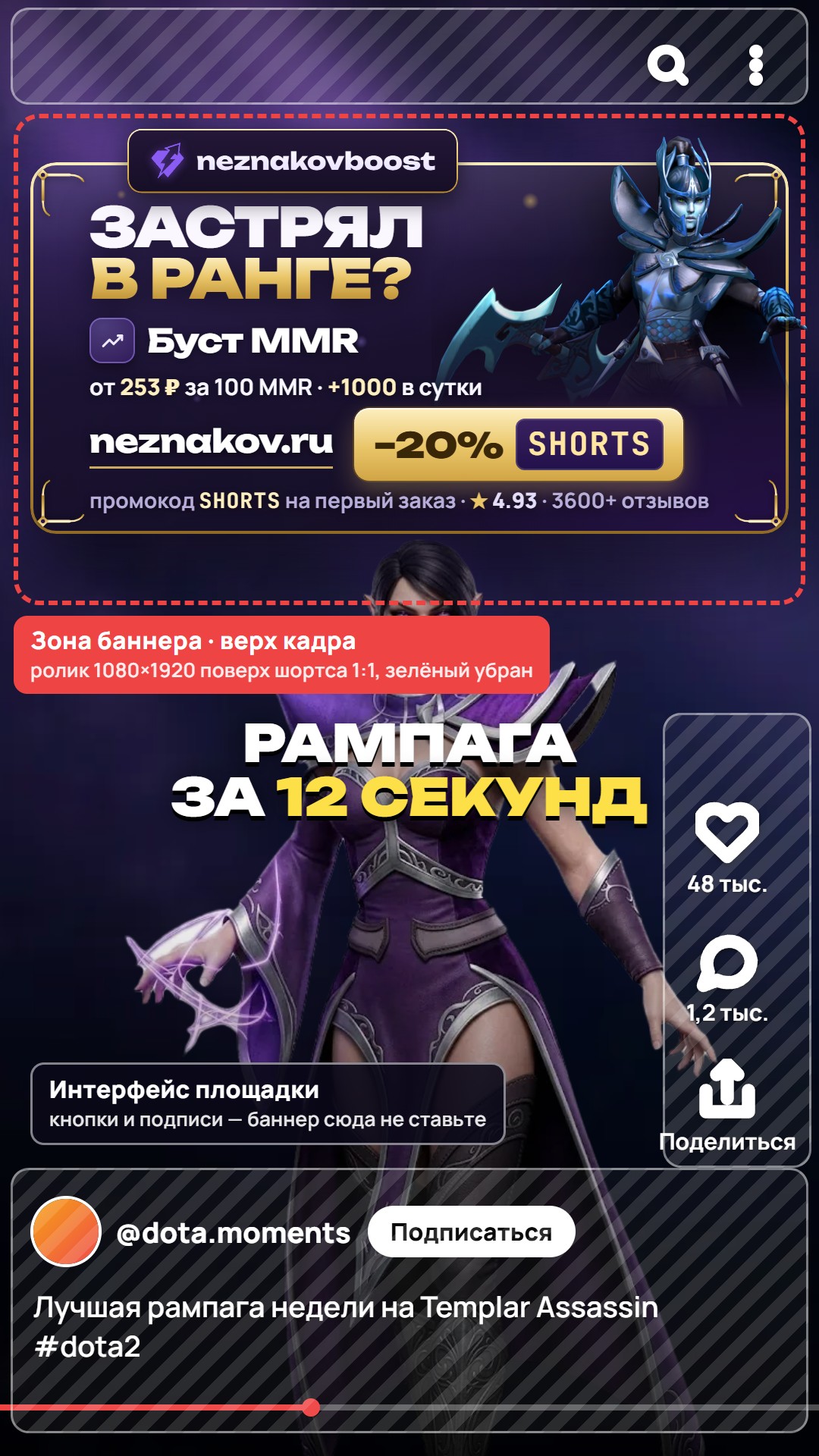
Latest Shorts from our channel Neznakov: a Dota 2 game moment, the banner at the top of the frame.


How to start: three steps to a payout
Everything happens in the Telegram bot: terms, the kit and answers about your channel.
Message the bot
“Start in Telegram” — the bot sends the terms and the kit. Reply with your channel link and screenshots of geo and reach.
Add the banner
The animated banner goes over your short full-frame, the green background keyed out. Nothing covering it, for the whole video. Send the link to the bot.
Get paid
Views are fixed on day 10 and summed over the month. Paid once a month — to a Russian bank card, via SBP or in USDT.

- Dota 2 only
- Fixed on day 10
- Paid once a month
- Inflated views — no payout
Calculator
How much you can earn
Move the slider to see the monthly payout at the base rate and at the quality-traffic rate.
Monthly payout
10,000–20,000 ₽
- Base rate
- 5,000 ₽ per 1M
- Quality traffic
- up to 10,000 ₽ per 1M
An estimate. We name your exact rate after checking the channel: geo, reach, banner visibility.
Get your rateHow we count
Transparent view count
Same rules for every creator: views fixed on day 10, summed over the month, reported in a spreadsheet.
-
Fixed on day 10
A video posted on August 16 is counted by its views on August 26 — that number goes into the payout.
-

Monthly total
We add up the views of all your videos with the banner for the month — that is the payout base.
-
Spreadsheet report
Once approved, you keep a spreadsheet: video link, views on day 10, a stats screenshot. The template is in the kit.
-
Paid once a month
To a Russian bank card, via SBP or in USDT — whichever suits you.
Example: August payout
| Video | Views on day 10 |
|---|---|
| Invoker rampageposted Aug 3 → counted Aug 13 | 1,200,000 |
| Top 5 fails of the weekposted Aug 12 → counted Aug 22 | 640,000 |
| Stream clipposted Aug 16 → counted Aug 26 | 2,100,000 |
| Month total | 3,940,000 |
Creator kit
Banner and placement rules
Download the animated banner and the placement example — the bot sends the same files in Telegram.
Animated banner with promo code SHORTS
Five services in turn, each with its own Dota 2 hero. The card shows promo code SHORTS: with it, your viewers get 20 % off their first order.
A full-frame 1080×1920 video on a green background — ready for chroma key in any editor.

How to add the banner
- Download the banner video — MP4 1080×1920 on a green background.
- Lay it over your short full-frame, without rescaling: in CapCut — “Overlay”.
- Remove the green with chroma key: “Remove background” → “Chroma key”.
- Stretch it over the whole video: a seamless 22 second loop — repeat it to the end.

✓Like this
- ✓Only our animated banner from the kit — as is
- ✓Full-frame 1:1 over the video: the banner sits at the top of the frame
- ✓The banner stays on screen the whole video — from the first second to the last
- ✓Nothing covers it: no text, no stickers, no platform buttons
✕Not like this
- ✕Don’t change the banner’s text, prices, promo code or colors
- ✕Don’t shrink or move the banner, don’t make it translucent
- ✕Don’t leave a green fringe — key out the background cleanly
- ✕Don’t inflate views — we check videos with analytics services
Incorrect placement — a shrunk, cropped, blurry or covered banner, an unreadable domain — lowers the rate. Inflated views void the payout.
Frequently asked questions
Rate, views, payouts and the banner — in short.
5,000 ₽ per 1M views is the base rate. For quality traffic — up to 10,000 ₽ per 1M. We name the exact rate for your channel after checking it.
On traffic quality: where your viewers are from (geo), whether the views are real, whether people watch to the end and how visible the banner is.
YouTube Shorts, Instagram Reels*, TikTok and VK Clips. If you have channels on several platforms, send the bot links to all of them.
Dota 2 only: highlights, memes, stream clips, short guides, the pro scene, patches. Videos about other games or on general topics are not part of the program.
There’s no hard threshold: we look at reach, geo and a live audience. Send us your stats and we’ll tell you whether the channel fits.
On day 10 after publication. A video posted on August 16 is counted by its views on August 26 — that number goes into the payout.
Once a month: we add up the views of all your videos with the banner for the month. We pay to a Russian bank card, via SBP or in USDT.
Download the banner video — MP4 1080×1920 on a green background. Lay it over your short full-frame without rescaling and remove the green with chroma key: in CapCut — “Overlay”, then “Remove background” → “Chroma key”. The banner runs 22 seconds and loops seamlessly — in a longer video, repeat it to the end.
A promo code for your viewers: it gives them 20 % off their first order at NeznakovBoost.
We lower the rate if the banner is shrunk or cropped, blurry, the domain is unreadable or text covers it. The rules are in the “Creator kit” section.
No. We check every video for inflated views with analytics services — inflation voids the payout.
Yes: bring customers through your link and earn a percentage of their orders — affiliate program.
Ready to earn from your clips?
Message the bot — it sends the terms and the kit. Once we’ve checked your channel, we’ll name your rate.